

Assalam o alaikum
now i am telling you about how to set your FACEBOOK and TWITTER status, there are following steps.
Step 1. login your facebook account

step 2.
go to account setting
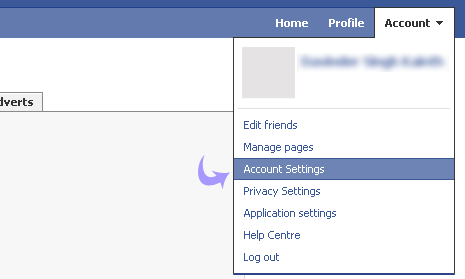
step 3.
go to mobile setting

select country and Sim.
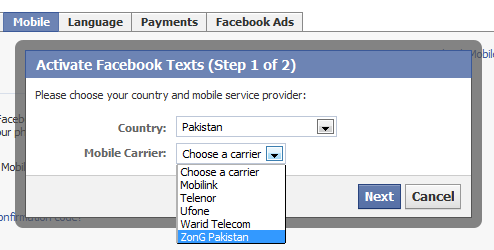
enter your Sim number.

you will receive a confirmation code, inter it this in box and then Enter
if you not receive code, now write F in text box and send it 32665. then you receive code after few mints. processing complete you are attached facebook by your mobile.
now its time for free
so Click this
registered on this site and click on facebook connection. enter your number.
now you type
Fb<space>your message
and send it to
+923314232289 and start free SMS
this method in also use on
TWITTER
Foreign user click on it FACEBOOK/TWITTER FREE SMS
For more detail FACEBOOK
now i am telling you about how to set your FACEBOOK and TWITTER status, there are following steps.
Step 1. login your facebook account
step 2.
go to account setting
step 3.
go to mobile setting
select country and Sim.
enter your Sim number.
you will receive a confirmation code, inter it this in box and then Enter
if you not receive code, now write F in text box and send it 32665. then you receive code after few mints. processing complete you are attached facebook by your mobile.
now its time for free
so Click this
registered on this site and click on facebook connection. enter your number.
now you type
Fb<space>your message
and send it to
+923314232289 and start free SMS
this method in also use on
Foreign user click on it FACEBOOK/TWITTER FREE SMS
For more detail FACEBOOK


0 Comments